用于搜索字符串的 JavaScript 方法:
-
String.indexOf()
-
String.lastIndexOf()
-
String.startsWith()
-
String.endsWith()
String.indexOf()
indexOf() 方法返回指定文本在字符串中第一次出现(的位置)的索引:let str = "Please locate where 'locate' occurs!";
str.indexOf("locate") // 返回 7
JavaScript 从零开始计算位置。
0 是字符串中的第一个位置,1 是第二个,2 是第三个 ......
String.lastIndexOf()
lastIndexOf() 方法返回指定文本在字符串中最后一次出现的索引:let str = "Please locate where 'locate' occurs!";
str.lastIndexOf("locate") // 返回 21
如果未找到文本,
indexOf() 和 lastIndexOf() 都返回 -1:let str = "Please locate where 'locate' occurs!";
str.lastIndexOf("Bill") // 返回 -1
这两种方法都接受第二个参数作为搜索的开始位置:
let str = "Please locate where 'locate' occurs!";
str.indexOf("locate", 15)    // 返回 21
lastIndexOf() 方法向后搜索(从末尾到开头),意思是:如果第二个参数是 15,则从位置 15 开始搜索,一直搜索到字符串的开头。let str = "Please locate where 'locate' occurs!";
str.lastIndexOf("locate", 15) // 返回 7
String.search()
search() 方法在字符串中搜索指定值并返回匹配的位置:let str = "Please locate where 'locate' occurs!";
str.search("locate") // 返回 7
您注意到了吗?
indexOf() 和 search() 这两个方法,相等吗?它们接受相同的参数,并返回相同的值?
这两种方法并不相等。差别如下:
-
search()方法不能接受第二个起始位置参数。 -
indexOf()方法不能采用强大的搜索值(正则表达式)。
您将在后面的章节中学到有关正则表达式的更多内容。
String.match()
match() 方法根据正则表达式在字符串中搜索匹配项,并将匹配项作为 Array 对象返回。
实例 1
在字符串中搜索 "ain":
let text = "The rain in SPAIN stays mainly in the plain";
text.match(/ain/g)    // 返回数组 [ain,ain,ain]
请在 JS RegExp 一章中学习有关正则表达式的更多内容。
如果正则表达式不包含 g 修饰符(执行全局搜索),match() 方法将只返回字符串中的第一个匹配项。
string.match(regexp)

实例 2
对 "ain" 执行不区分大小写的全局搜索:
let text = "The rain in SPAIN stays mainly in the plain";
text.match(/ain/gi)   // 返回数组 [ain,AIN,ain,ain]
String.includes()
如果字符串包含指定值,
includes() 方法返回 true。let text = "Hello world, welcome to the universe.";
text.includes("world") // 返回 true
语法
string.includes(searchvalue, start)
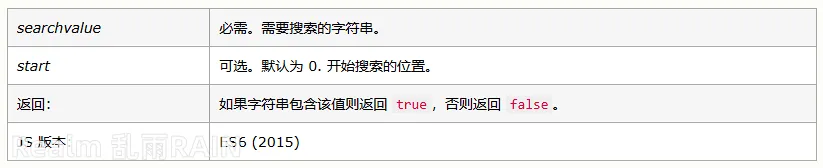 检查字符串是否包含 "world",从位置 12 开始搜索:
let text = "Hello world, welcome to the universe.";
text.includes("world", 12) // 返回 false
String.startsWith()
如果字符串以指定值开头,则
startsWith() 方法返回 true,否则返回 false:let text = "Hello world, welcome to the universe.";
text.startsWith("Hello") // 返回 true
语法
string.startsWith(searchvalue, start)
参数值

实例
实例
let text = "Hello world, welcome to the universe.";

text.startsWith("world")    // 返回 false
let text = "Hello world, welcome to the universe.";

text.startsWith("world", 5)    // 返回 false
let text = "Hello world, welcome to the universe.";

text.startsWith("world", 6)    // 返回 true
注释:
startsWith() 方法区分大小写。String.endsWith()
如果字符串以指定值结尾,则
endsWith() 方法返回 true,否则返回 false:实例
检查字符串是否以 "Gates" 结尾:
var text = "Bill Gates";
text.endsWith("Gates")    // 返回 true
语法
string.endsWith(searchvalue, length)
参数值
 检索以 "world" 结尾的字符串的前 11 个字符:
let text = "Hello world, welcome to the universe.";
text.endsWith("world", 11) // 返回 true
注释:
endsWith() 方法区分大小写。